

When applying for a loan, a passport, or filling out government forms, you are often required to upload your Aadhaar, PAN card, or bank statements in PDF format. But what if you only have photos (JPGs) of these documents on your phone?
Why Converting Identity Documents Online is Risky
The first instinct for most people is to search for a "free JPG to PDF converter" online. However, uploading photos of your highly sensitive identity documents to a random cloud server is a massive security risk. These platforms often retain your files, leaving your personal data vulnerable to identity theft, phishing attacks, and data breaches.
The Bramhify Solution
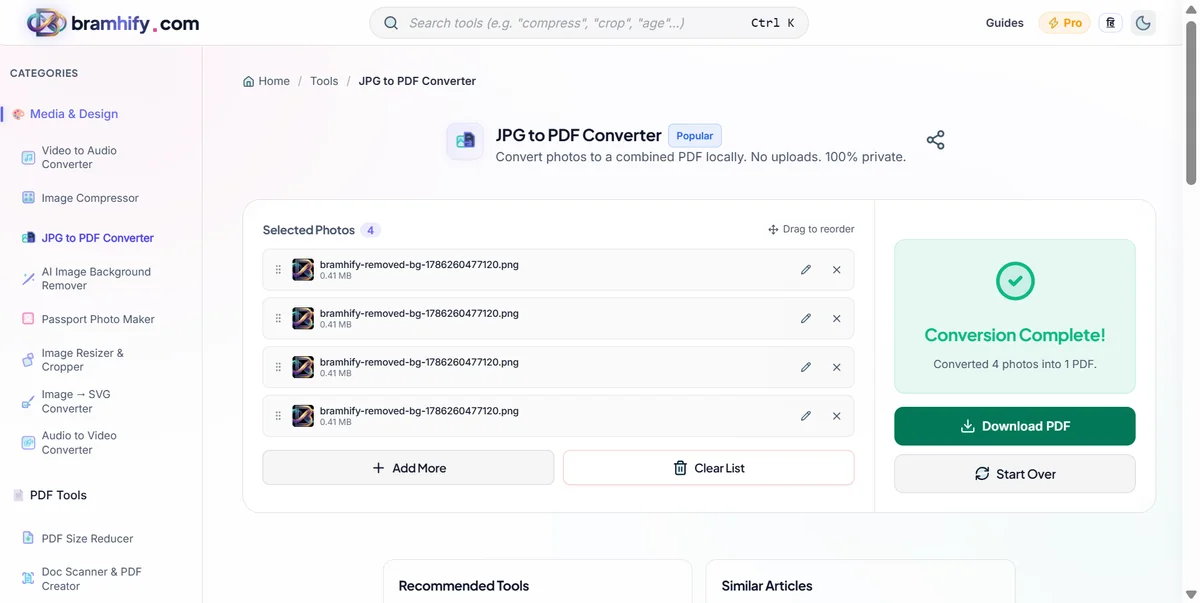
You shouldn't have to risk your identity just to convert a file format. Bramhify's JPG to PDF Converter solves this problem by processing your images 100% locally. Using advanced WebAssembly technology, the tool converts your JPG photos into a secure PDF directly inside your own browser. Your images never leave your phone, guaranteeing complete privacy and zero upload wait times.
JPG to PDF Converter:

Quick Steps
Here is how you can instantly and securely convert your document photos into a single PDF file:
Step 1: Select Your Photos
Open the JPG to PDF tool and tap the upload area. Select the photos (JPG, PNG, or WEBP) of your documents from your phone's gallery. Since the processing happens on your device, the images will load instantly.
Step 2: Arrange the Order
Once your images are loaded, you can easily drag and drop them to rearrange their order. Ensure the front and back of your documents are sorted correctly.
Step 3: Convert to PDF
Tap the "Convert to PDF" button. The tool will instantly embed your images into a secure PDF document right inside your browser.
Step 4: Download Your Document
Tap download to save the newly created PDF file securely to your phone. That's it! You're done, and your private data is safe.
Frequently Asked Questions (FAQs)
Is it safe to convert my Aadhaar or PAN card photos?
Absolutely. Since our tool processes the images entirely locally on your device, your sensitive identity documents are never uploaded to our servers, keeping you 100% safe from data leaks.
Can I convert multiple JPGs into one single PDF?
Yes! You can select multiple images at once, and the tool will combine them into a single PDF file, with each image perfectly fitted onto its own page.
Will the PDF conversion reduce the quality of my documents?
No. The converter embeds the original images into the PDF without aggressive compression, ensuring that the text and details on your documents remain sharp and legible.
For more document management tips, check out our guides on how to compress your Aadhaar card photo online and how to scan a document to PDF on your phone.